02 Getting started with Scrypto
2.2 Scrypto Package Structure
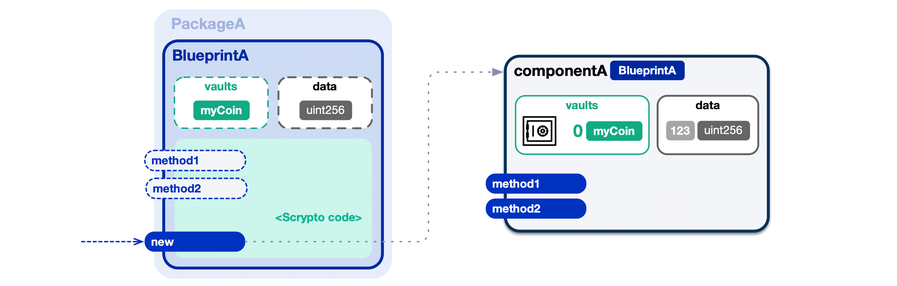
What is a “Scrypto package” composed of? A Scrypto package contains one or more blueprints that detail the functionality of your Decentralized Application (dApp). Blueprint(s) contain the collection of program logic and data that a dApp needs to function. A Scrypto package may be simple where it only contains one blueprint, or it may be a bit more complex requiring multiple blueprints. Depending on your dApp’s ambition, it is entirely possible to build a dApp with a single blueprint. However as your dApp becomes more complex, it makes sense to split logic into separate modular blueprints, making things more flexible, manageable and just overall easier to work with.
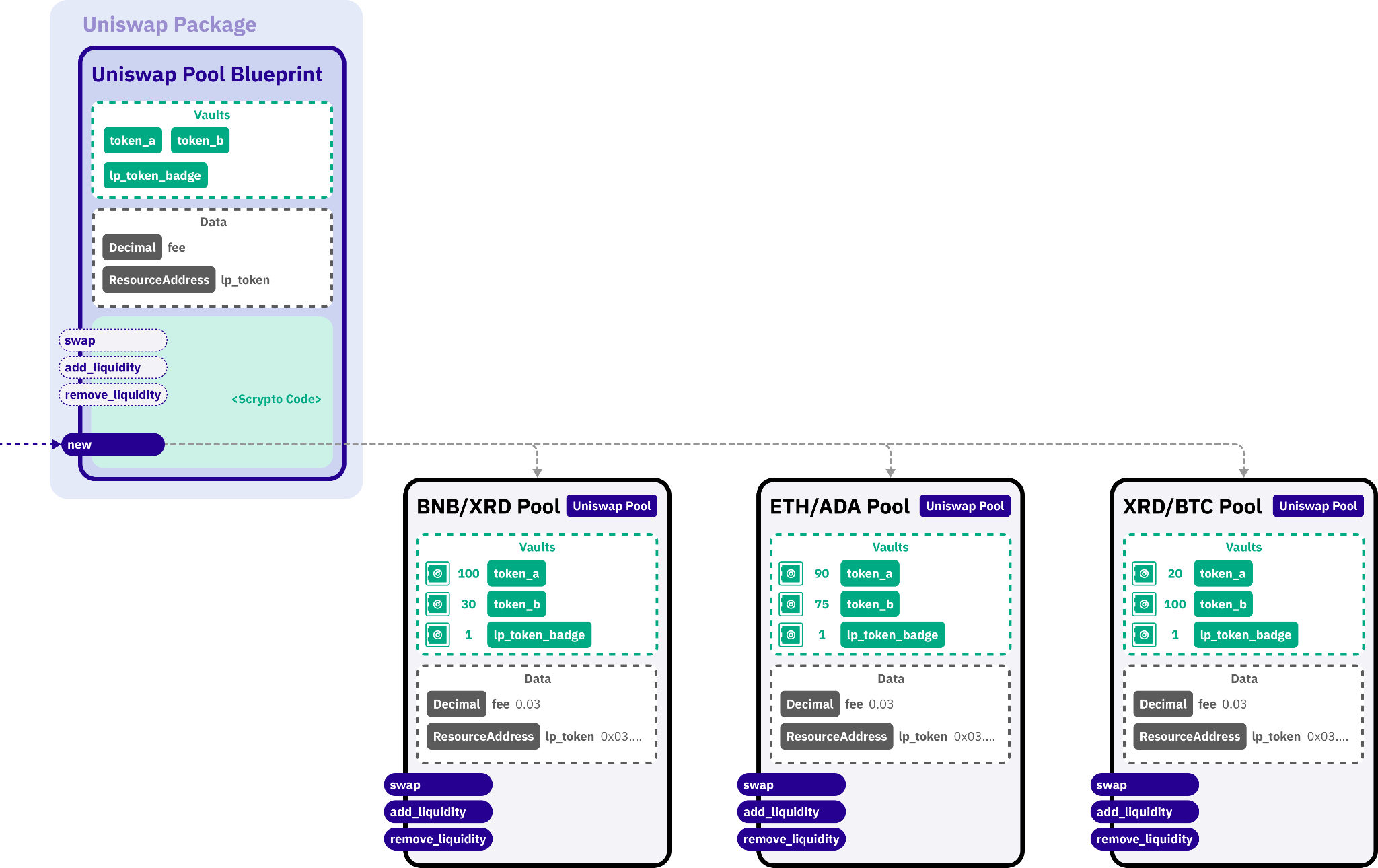
//Structure of a DEX with Scrypto Package
Let’s say that you want to build a simple Decentralized Exchange (DEX). You can of course write a blueprint that describes the functionality of one liquidity pool. Or you may choose to add more features and complexity by having one blueprint that describes an interface of your DEX and a second blueprint which describes the logic of a liquidity pool. Together, the blueprints within your Scrypto package define the mechanics of how your dApp operates on the network. As the name infers, blueprints are design plans detailing how to construct your dApp at runtime. A blueprint does not carry out actions requested by users, that is the job of the component instantiated from said blueprint. Similar to the concept of a class definition and an instance of that class in object-oriented programming where the class is the blueprint and the object or instance of that class is the component. You might also draw a comparison between components and what are commonly called smart contracts in Web3 which have important distinctions from blueprints.
Just as you can create a car class which can be reused to instantiate different cars such as a Ferrari and a Lamborghini object. Scrypto Blueprints can be reused to instantiate different components with similar yet different characteristics. The concept of Packages takes this yet one step further giving you reusable sets of blueprints similar to that of importing a package or library in your programming language of choice eg. NPM or Nugget. You can even go so far as having multiple instantiation functions in your blueprints which create components with different variations while still reusing common functionality.
To go back to our DEX example, say we have a generic instantiation of the the blueprint which describes the interface of the DEX. A user may interact with the interface component to create multiple liquidity pools of different token pairs, but behind the scenes, the interface component will instantiate the second blueprint which contains the liquidity pool logic and each liquidity pool based on the multiple token pairs the user has requested. The first component may also organize and route users to the correct liquidity pools that have been instantiated by the second blueprint.
Just as you can create a car class which can be reused to instantiate different cars such as a Ferrari and a Lamborghini object. Scrypto Blueprints can be reused to instantiate different components with similar yet different characteristics. The concept of Packages takes this yet one step further giving you reusable sets of blueprints similar to that of importing a package or library in your programming language of choice eg. NPM or Nugget. You can even go so far as having multiple instantiation functions in your blueprints which create components with different variations while still reusing common functionality.
To go back to our DEX example, say we have a generic instantiation of the the blueprint which describes the interface of the DEX. A user may interact with the interface component to create multiple liquidity pools of different token pairs, but behind the scenes, the interface component will instantiate the second blueprint which contains the liquidity pool logic and each liquidity pool based on the multiple token pairs the user has requested. The first component may also organize and route users to the correct liquidity pools that have been instantiated by the second blueprint.
Components are the live programs of a blueprint which users can actually interact with. They can hold state, change state, and carry out actions based on the logic they contain as described by the blueprint. Throughout this chapter, we will explore this concept more.
Fun Fact: Radix Blueprints VS Ethereum FactoryOn Ethereum they came up with the concept of factory smart contracts that work similarly but those factories are not recognized at the platform level. For example, the developers of Uniswap (a popular decentralized exchange on Ethereum), provided a trading pair factory for anyone to instantiate a new pair smart contract. It may look similar to our Blueprint-Component model but in reality, the platform doesn’t really know where the trading pair contract was instantiated from and it adds a burden on the developer since they now have to deploy factory contracts alongside their main contract in order to offer more reusability.
//Deploying a Scrypto Package to the Radix Network
Now that you understand the architectural construct of Scrypto Packages, let’s visualize how this pattern works when we are to deploy a local Scrypto package to a live network on Radix. When Scrypto packages are published to the network, the Radix Engine which runs the application layer, processes your Scrypto package and understands the blueprints within it. The Scrypto package is then recognized as a “global entity” within the network. In other words, the Scrypto package is given an identifiable address called a
As a result, users on the network can retrieve this
PackageAddress. This address can be located within the network and can be referenced to call blueprint functions. As a result, users on the network can retrieve this
PackageAddress and instantiate their own components from the blueprint(s) within your Scrypto package. Once components are instantiated, they can also be “globalized” to become a global entity on the network. This would provide instantiated components with their own identifiable address called a ComponentAddress which can also be referenced to call component methods.//Creating a New Scrypto Package
Now that we have a conceptual understanding of each part of a Scrypto package, let’s begin by pulling up our terminal and finding a place where we can create a boilerplate Scrypto package. You can do this by inputting
scrypto new-package [package_name] for example, scrypto new-package hello. Once you know where you want your Scrypto package to live.If the command
scrypto new-package doesn’t work in your terminal, you’ll need to install the Scrypto Toolchain.You cannot use numbers as your package name. Rust will not be able to compile your package.
When executed, the
new-package command will create a new directory using the name you provided as the package_name argument. Let’s open up VScode and open the folder of where your Scrypto package is located and understand the package directory structure.//Directory Structure
The Scrypto package you just created is a boilerplate called for a Hello blueprint. At the root of the generated package directory, you should find three things:
If you’ve programmed in Rust before, you’ll immediately find this structure to be familiar and that’s because Scrypto is based on Rust! The
Let’s move our attention a bit to the tests folder. This is where you write unit and integration tests for your package. You can run the tests located in this directory with the scrypto test command in your terminal. This is good for creating exotic and custom test scenarios. However, in this course, we’ll be using the handy
The
src(source) foldertestsfolderCargo.tomlfile.
If you’ve programmed in Rust before, you’ll immediately find this structure to be familiar and that’s because Scrypto is based on Rust! The
Cargo.toml is a Rust-related file that provides metadata about the package, dependencies such as the Scrypto library that allows us to write Scrypto code, and parameters to build your Scrypto package. If you’re unfamiliar with this file, don’t worry about it too much. But if you’re curious, you may read up on it in the Rust docs.Let’s move our attention a bit to the tests folder. This is where you write unit and integration tests for your package. You can run the tests located in this directory with the scrypto test command in your terminal. This is good for creating exotic and custom test scenarios. However, in this course, we’ll be using the handy
resim to interact and test the Scrypto packages we create.The
src folder is where you will write your Scrypto code or in other words, your blueprint. Within this folder, you will find the lib.rs file, which contains the Hello blueprint code. All packages must have a lib.rs file - which is the starting point of your Scrypto package. Since Hello is a simple package, we’ve put all our blueprint code within this file.