05 Transactions
5.2 The Transaction Manifest in Practice
When it comes to understanding the transaction manifest, it’s easier to see it in action before we dive into concepts. So this section will go through a few interactive examples by sending a few transactions with a transaction manifest through a test network to get a clear picture how they work in practice. To do so we recommend that you:
- Set up and install the Radix Wallet
- Head over to the Developer Console
- Make sure that the Radix Wallet Gateway is pointed to “Stokenet Gateway”
- You can do this by going to your wallet Settings → App Settings → Gateways
- Create a New Account
- Go to the Account Settings (three dots in the upper-right corner)
- Go to Dev Preferences
- Click on Get XRD Test Tokens
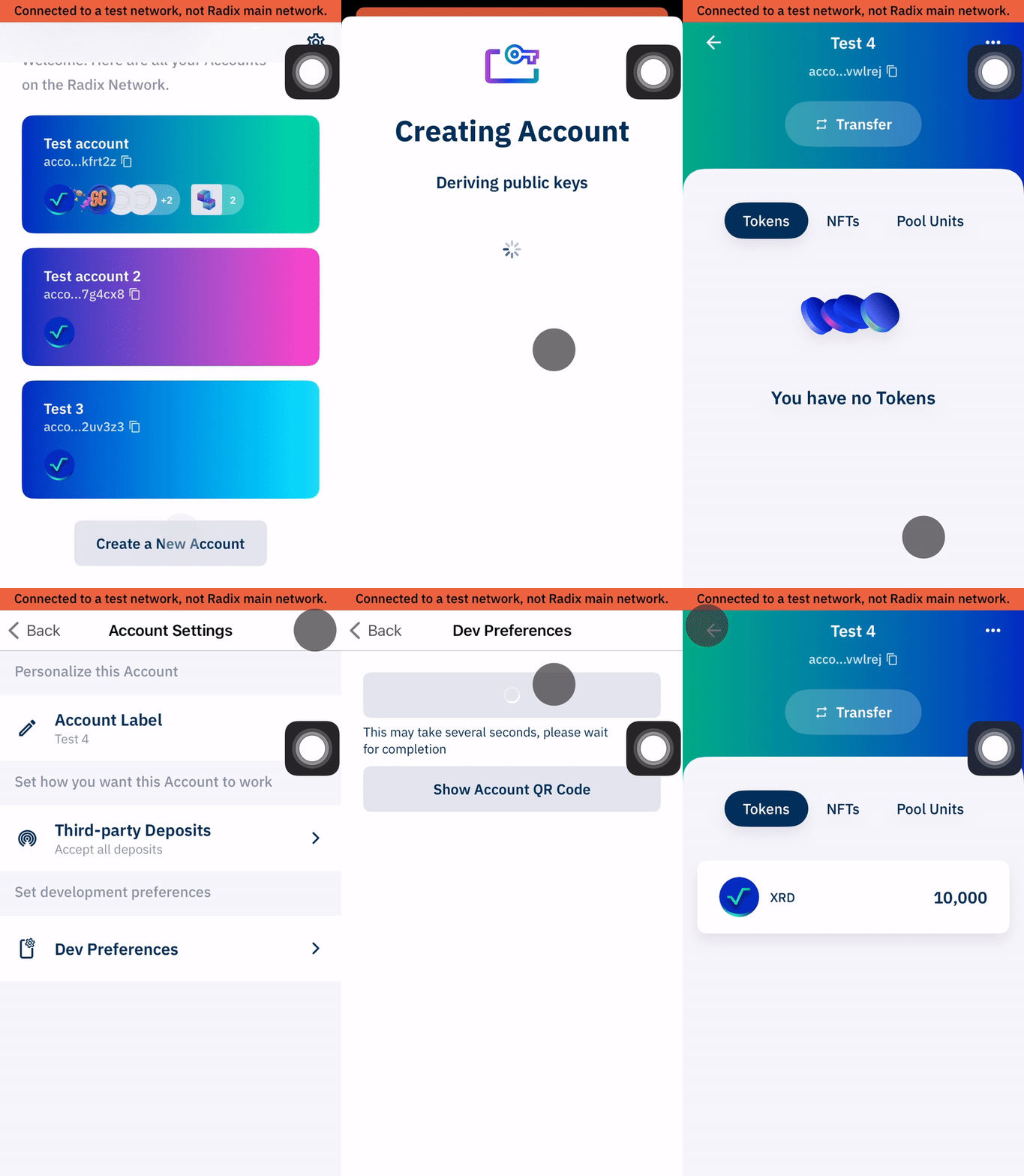
Once that’s completed, we can begin going through a few transaction manifest examples!
//Sending Tokens to Another Account
Once you have an account with some XRD test tokens, we are going to create another account to deposit 100 XRD test tokens.
We can send tokens between account by simply pasting in this transaction manifest to the Send Transaction Manifest within the Developer Console. Make sure to replace the the addresses within
We can send tokens between account by simply pasting in this transaction manifest to the Send Transaction Manifest within the Developer Console. Make sure to replace the the addresses within
${this_account_address} with accounts you've set up as well as the ResourceAddress you’d like to send.To get the XRD test tokens ResourceAddress you can open your first account with the XRD test tokens and copy the ResourceAddress shown on the token.
# Withdrawing 100 XRD from the account componentCALL_METHOD Address("${this_account_address}") "withdraw" Address("${xrd_resource_address}") Decimal("100");# Depositing all of the XRD withdrawn from the account into the other accountCALL_METHOD Address("${other_account_address}") "try_deposit_batch_or_abort" Expression("ENTIRE_WORKTOP") None;Test XRD ResourceAddress is resource_tdx_2_1tknxxxxxxxxxradxrdxxxxxxxxx009923554798xxxxxxxxxtfd2jc
This transaction manifest has two simple instruction which specifies two method calls of two different accounts. One instruction is to withdraw a specified resource and amount from one account and depositing it all to a second account.
//Multi Account Transfer
The transaction manifest can also batch multiple instructions; we do not need to have separate transaction manifest files for each individual actions. For example, in this transaction manifest file below, we can submit a transaction to send to multiple accounts with some funds from our account. We also have an instruction to manage resources in the worktop and make sure the bucket of resources are being moved to the right accounts.
Here you have 330 XRD in
Here you have 330 XRD in
this_account_address and you will distribute the XRD into other accounts:- 150 to
account_address_a - 130 to
account_address_b - 50 to
account_address_c
# Withdrawing 330 XRD from the account componentCALL_METHOD Address("${this_account_address}") "withdraw" Address("${xrd_resource_address}") Decimal("330");# Taking 150 XRD from the worktop and depositing them into Account ATAKE_FROM_WORKTOP Address("${xrd_resource_address}") Decimal("150") Bucket("account_a_bucket");CALL_METHOD Address("${account_address_a}") "try_deposit_or_abort" Bucket("account_a_bucket") None;# Taking 130 XRD from the worktop and depositing them into Account BTAKE_FROM_WORKTOP Address("${xrd_resource_address}") Decimal("130") Bucket("account_b_bucket");CALL_METHOD Address("${account_address_b}") "try_deposit_or_abort" Bucket("account_b_bucket") None;# Taking 50 XRD from the worktop and depositing them into Account CTAKE_FROM_WORKTOP Address("${xrd_resource_address}") Decimal("50") Bucket("account_c_bucket");CALL_METHOD Address("${account_address_c}") "try_deposit_or_abort" Bucket("account_c_bucket") None;Note that the name of Bucket() can be anything you choose.
//Creating a Fungible Resource
All throughout this course, we’ve shown how resources are created within Scrypto; but in fact, you don’t need Scrypto to create resources. You can create resources by sending a transaction manifest!
# Creating a new resource with a divisibility of 18 and a name of `MyResource`. The resource has # default resource behavior where it can be withdrawn and deposited by anybody.CREATE_FUNGIBLE_RESOURCE_WITH_INITIAL_SUPPLY # Owner role - This gets metadata permissions, and is the default for other permissions # Can set as Enum<OwnerRole::Fixed>(access_rule) or Enum<OwnerRole::Updatable>(access_rule) Enum<OwnerRole::None>() true # Whether the engine should track supply (avoid for massively parallelizable tokens) 18u8 # Divisibility (between 0u8 and 18u8) Decimal("${initial_supply}") # Initial supply Tuple( Some( # Mint Roles (if None: defaults to DenyAll, DenyAll) Tuple( Some(Enum<AccessRule::AllowAll>()), # Minter (if None: defaults to Owner) Some(Enum<AccessRule::DenyAll>()) # Minter Updater (if None: defaults to Owner) ) ), None, # Burn Roles (if None: defaults to DenyAll, DenyAll) None, # Freeze Roles (if None: defaults to DenyAll, DenyAll) None, # Recall Roles (if None: defaults to DenyAll, DenyAll) None, # Withdraw Roles (if None: defaults to AllowAll, DenyAll) None # Deposit Roles (if None: defaults to AllowAll, DenyAll) ) Tuple( # Metadata initialization Map<String, Tuple>( # Initial metadata values "name" => Tuple( Some(Enum<Metadata::String>("MyResource")), # Resource Name true # Locked ) ), Map<String, Enum>( # Metadata roles "metadata_setter" => Some(Enum<AccessRule::AllowAll>()), # Metadata setter role "metadata_setter_updater" => None, # Metadata setter updater role as None defaults to OWNER "metadata_locker" => Some(Enum<AccessRule::DenyAll>()), # Metadata locker role "metadata_locker_updater" => None # Metadata locker updater role as None defaults to OWNER ) ) None; # No Address Reservation# Depositing the entirety of the initial supply of the newly created resource into our account # component.CALL_METHOD Address("${account_address}") "deposit_batch" Expression("ENTIRE_WORKTOP");There’s quite a bit going on here, but I’ve highlighted the key areas where you’d want to input for this transaction manifest to work. There are various comments to each instruction input if you’re curious to do your own configuration, but we’ll go over those more in detail. For now, we’re simply getting a feel to how transaction manifest work.
//Minting Supply of Existing Fungible Resource
So long as we have the badge that has permissions to mint a resource, the transaction manifest also have instructions to mint supply of a resource.
# Instruction to create a proof of a badge with minting permission.# Only needed if `minter` requires a badge.CALL_METHOD Address("${account_address}") "create_proof_of_amount" Address("${minter_badge_resource_address}") Decimal("1");# Minting some amount of tokens from the mintable fungible resourceMINT_FUNGIBLE Address("${mintable_fungible_resource_address}") Decimal("${mint_amount}");# Depositing the entirety of the newly minted tokens into out accountCALL_METHOD Address("${account_address}") "deposit_batch" Expression("ENTIRE_WORKTOP");//Creating a NonFungible Resource
Here’s a similar transaction manifest instruction to create and mint a non-fungible resource. Again, quite a bit going on, but we’ll get through it in due time. We can simply copy and paste this in and input our own values in the highlighted lines.
# Creating a new resource CREATE_NON_FUNGIBLE_RESOURCE_WITH_INITIAL_SUPPLY # Owner role - This gets metadata permissions, and is the default for other permissions # Can set as Enum<OwnerRole::Fixed>(access_rule) or Enum<OwnerRole::Updatable>(access_rule) Enum<OwnerRole::None>() Enum<NonFungibleIdType::Integer>() # The type of NonFungible Id true # Whether the engine should track supply (avoid for massively parallelizable tokens) Enum<0u8>(Enum<0u8>(Tuple(Array<Enum>(), Array<Tuple>(), Array<Enum>())), Enum<0u8>(66u8), Array<String>()) # Non Fungible Data Schema Map<NonFungibleLocalId, Tuple>( # Initial supply to mint NonFungibleLocalId("${non_fungible_local_id}") => Tuple(Tuple()) # Since NonFungibleIdType is an integer, the number must be enclosed in numeric characters, such as NonFungibleLocalId("#1#") ) Tuple( Some( # Mint Roles (if None: defaults to DenyAll, DenyAll) Tuple( Some(Enum<AccessRule::AllowAll>()), # Minter (if None: defaults to Owner) Some(Enum<AccessRule::DenyAll>()) # Minter Updater (if None: defaults to Owner) ) ), None, # Burn Roles (if None: defaults to DenyAll, DenyAll) None, # Freeze Roles (if None: defaults to DenyAll, DenyAll) None, # Recall Roles (if None: defaults to DenyAll, DenyAll) None, # Withdraw Roles (if None: defaults to AllowAll, DenyAll) None, # Deposit Roles (if None: defaults to AllowAll, DenyAll) None # Non Fungible Data Update Roles (if None: defaults to DenyAll, DenyAll) ) Tuple( # Metadata initialization Map<String, Tuple>( # Initial metadata values "name" => Tuple( Some(Enum<Metadata::String>("MyResource")), # Resource Name true # Locked ) ), Map<String, Enum>( # Metadata roles "metadata_setter" => Some(Enum<AccessRule::AllowAll>()), # Metadata setter role "metadata_setter_updater" => None, # Metadata setter updater role as None defaults to OWNER "metadata_locker" => Some(Enum<AccessRule::DenyAll>()), # Metadata locker role "metadata_locker_updater" => None # Metadata locker updater role as None defaults to OWNER ) ) None; # No Address Reservation# Depositing the entirety of the initial supply of the newly created resource into our account # component.CALL_METHOD Address("${account_address}") "deposit_batch" Expression("ENTIRE_WORKTOP");//Minting Supply of Existing NonFungible Resource
Similarly, the transaction manifest also has an instruction to mint non-fungible resources as well.
# Instruction to create a proof of a badge with minting permission.# Only needed if `minter` requires a badge.CALL_METHOD Address("${account_address}") "create_proof_of_amount" Address("${minter_badge_resource_address}") Decimal("1");# Minting a single non-fungible token from the resource. This non-fungible token has no data.MINT_NON_FUNGIBLE Address("${mintable_non_fungible_resource_address}") Map<NonFungibleLocalId, Tuple>( NonFungibleLocalId("${non_fungible_local_id}") => Tuple(Tuple()) );# Depositing the entirety of the newly minted tokens into out accountCALL_METHOD Address("${account_address}") "deposit_batch" Expression("ENTIRE_WORKTOP");//Generating Transaction Manifest files with Resim
There are of course more instructions a transaction manifest has. You can find a list of instructions which you may copy and paste to the console to test yourself in the documentation. However, this is just to get a flavor of how transaction manifest works. You can also run transaction manifest files using
You can see this for yourself by creating a new account in resim (if you haven’t already) and inputting the command
resim. In fact, resim is either generating and running transaction manifest under the hood with every command we input.You can see this for yourself by creating a new account in resim (if you haven’t already) and inputting the command
resim new-token-fixed 1000 --manifest new_token.rtm which will create a manifest file in the directory your terminal is in titled new_token.rtm. If you open that file in a text editor, it will look something like this:CALL_METHOD Address("component_sim1cptxxxxxxxxxfaucetxxxxxxxxx000527798379xxxxxxxxxhkrefh") "lock_fee" Decimal("5000");CREATE_FUNGIBLE_RESOURCE_WITH_INITIAL_SUPPLY Enum<0u8>() true 18u8 Decimal("1000") Tuple( Enum<0u8>(), Enum<0u8>(), Enum<0u8>(), Enum<0u8>(), Enum<0u8>(), Enum<0u8>() ) Tuple( Map<String, Tuple>(), Map<String, Enum>() ) Enum<0u8>();CALL_METHOD Address("account_sim1c956qr3kxlgypxwst89j9yf24tjc7zxd4up38x37zr6q4jxdx9rhma") "try_deposit_batch_or_refund" Expression("ENTIRE_WORKTOP") Enum<0u8>();Of course, it’ll the transaction manifest file will have your own account address. Although, you’ll notice that there’s an additional
We haven’t actually ran this manifest file yet. The
CALL_METHOD instruction to lock_fee. We’ll get into that in due time. We haven’t actually ran this manifest file yet. The
resim command we inputted only generated a transaction manifest file. To run the file we’ll need to input resim run new_token.rtm which will process the transaction to create and mint your tokens!