03 Resources
3.2 Creating Fungible Resources
Creating resources within Scrypto is simple. Every resource definition starts with the
ResourceBuilder, which immediately opens your option to specify the resource type you’d like to create. The ResourceBuilder serves as a Scrypto interface for resource creation, equipping it with built-in special functions and methods that are readily available for configuring your resource definitions. Let’s take a look at the general structure of a resource definition.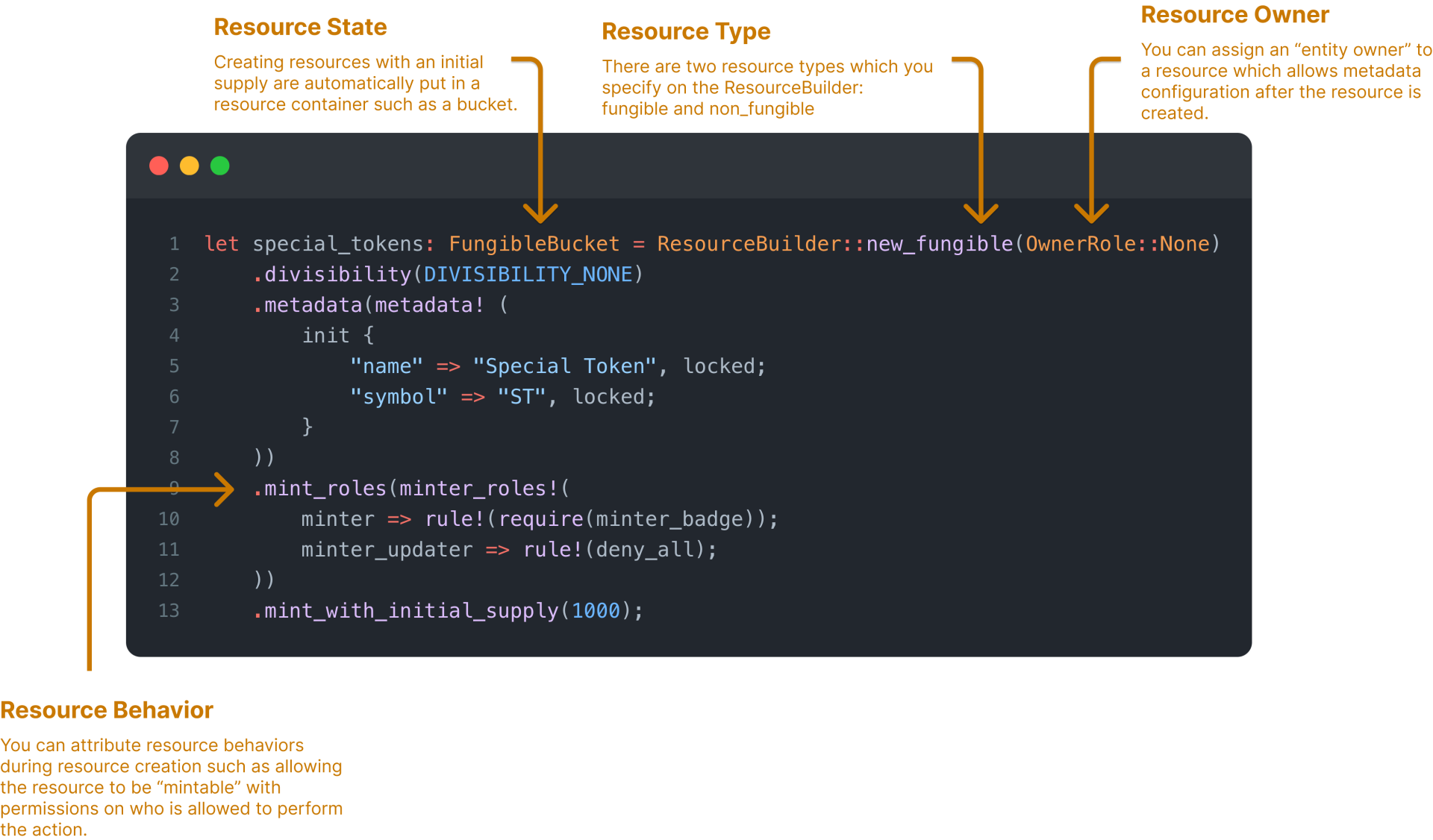
We have a few things to chew on here, so let’s go through it.
//Resource Definition
You can configure how a resource is created based on its resource definition. A resource definition are composed of attributes and behaviors you’d like your resource to have. For example, if you’d like to create a token, you’d want to define its properties. This may be a fungible or non-fungible token and it may have a set of metadata which describes your token to its holders. Here, we’ll lay out the anatomy of a resource definition.
Now that you understand the basic anatomy of a resource, we’ll quickly go through the general process of creating a resource within Scrypto then dive back into resource behaviors in the next page as there’s some finer details that we need to disseminate.
- Resource Type - The resource type describes whether your resource is either a fungible or non-fungible. Specifying which resource type you’d like to create with the
ResourceBuilderexposes you with specialized configuration for each respective type. In other words, there are configurations exposed to fungible resources that are not available for non-fungible resources and vice-versa. - Resource Owner - Each resource you create may have an owner, which is a role that can be used to define the admin of the resource. A resource can be assigned an owner by defining the OwnerRole when using the
ResourceBuilderto create a resource. Assigning an owner to a resource allows the owner to configure the resource’s metadata by default. The owner can also inherit other resource permissions if enabled and defined. - Resource State - The resource state is where we want our resource to be after its creation. Notice Line 13 that we’ve stated that at the creation of this resource, a supply of 1,000 of “Special Token” will be minted. As we’ve briefly discussed at the introduction of this chapter, existing resources must be in some kind of resource container. When a resource is initially minted, it’ll be placed into a bucket where we can move it elsewhere, like a vault where it can be contained in a permanent resource container.
- Resource Behavior - Resource behaviors are what makes resources we create powerful. They allow resources to have special properties like the ability for resources to be “mintable” or “burnable”. There are many sets of resource behaviors that you can mix and match or apply to resources you create. There will be a section that covers the entirety of this later, just know that we can make our resources more powerful by applying resource behaviors.
Now that you understand the basic anatomy of a resource, we’ll quickly go through the general process of creating a resource within Scrypto then dive back into resource behaviors in the next page as there’s some finer details that we need to disseminate.
The concepts of “owners” are part of a larger topic in Chapter 4: Introduction to Auth and for this chapter, we will simply have the OwnerRole specified to None, meaning that this resource will not have an owner.
//Defining a Simple Fungible Token
So let’s explore how we can define a fungible resource with the
ResourceBuilder. Starting from the basic, you technically only need define the resource type and determine whether this resource will have a supply during its creation.let special_tokens: FungibleBucket = ResourceBuilder::new_fungible(OwnerRole::None) .mint_initial_supply(1000);Specifying that a resource will have an initial supply by calling
.mint_initial_supply(amount) will return a FungibleBucket or NonFungibleBucket depending on the resource type you choose. Remember that resources with supply needs to be in some kind of resource container such as a bucket or a vault.Resources with No Initial Supply
But what if you don’t want to have an initial supply of the resource? Doing so will require us to specifically call on
.create_with_no_initial_supply() which will return us a ResourceManager instead of a bucket.let special_tokens: ResourceManager = ResourceBuilder::new_fungible(OwnerRole::None) .create_with_no_initial_supply();We’ll have a dedicated section for the
ResourceManager later in the chapter, but a ResourceManager (by its name) is an interface (like the ResourceBuilder) which you can use to inspect and manage resources.Other Resource Attributes
We can configure other attributes to our resources as well. Because we are creating a fungible resource, we have an option to determine its divisibility, meaning the resource supply can be fractionalized.
let special_tokens: FungibleBucket = ResourceBuilder::new_fungible(OwnerRole::None) .divisibility(DIVISIBILITY_NONE) .mint_initial_supply(1000);Line 2: Divisibility determines whether the resource can be fractionalized. You can determine the divisibility of your token from 0 to 18 decimal places with
DIVISIBILITY_MAXIMUM at 18. If .divisibility() is not specified, then its divisibility is defaulted to DIVISIBILITY_MAXIMUM.We can also attribute metadata to our resources.let special_tokens: FungibleBucket = ResourceBuilder::new_fungible(OwnerRole::None) .divisibility(DIVISIBILITY_NONE) .metadata(metadata! ( init { "name" => "Special Token", locked; "symbol" => "ST", locked; } )) .mint_initial_supply(1000);By attributing metadata to our resource, we can convey information about our resource. Every metadata field created can be “locked” or “updatable”. An updatable metadata field will allow the resource owner (if assigned) the flexibility to change it after it’s been created while a locked metadata field will forever set it permanently. More about metadata configuration will be discussed in Chapter 3.3: Resource Behaviors.
Attributing Resource Behaviors
We can also configure resource behaviors as well. This means we can make a resource “mintable” which allows creating additional supplies of the resource or we can make a resource “burnable” which reduces the supply of a resource.
let special_tokens: ResourceManager = ResourceBuilder::new_fungible(OwnerRole::None) .divisibility(DIVISIBILITY_NONE) .metadata(metadata! ( init { "name" => "Special Token", locked; "symbol" => "ST", locked; } )) .mint_roles(mint_roles!( minter => rule!(require(admin_badge)); minter_updater => rule!(deny_all); )) .mint_initial_supply(1000);Attaching resource behaviors requires us to define a couple roles: The role that is allowed to perform the behavior such as
minter, in this example, and the role that is allowed to update who can access the minter. Defining these resource behavior roles allows us to create access rules which specifies the badge(s) required to access the role and its permission(s). This access rule is enforced by requiring the person to prove they own the specified badge to the Radix Engine before they are able to access the role and allowed to perform the permissioned behavior, such as the ability to mint additional supply of the resource in this case. We will discuss more about these permissions and exactly how they are performed in Chapter 4: Introduction to Auth.//Resource Definition Placement
We now have a basic setup to define and create a resource, you might wonder, where or when should a resource be defined/created? Just as you saw in Chapter 2.3: The Anatomy of a Blueprint where we deployed our HelloToken example, any resource we create can be defined within a instantiation function of our impl block.
use scrypto::prelude::*;#[blueprint]mod SpecialToken { struct SpecialToken { special_token_vault: FungibleVault, } impl SpecialToken { pub fn instantiate() -> Global<SpecialToken> { let special_tokens: FungibleBucket = ResourceBuilder::new_fungible(OwnerRole::None) .metadata(metadata! ( init { "name" => "Special Token", locked; "symbol" => "ST", locked; } )) .mint_initial_supply(1000); Self { special_token_vault: FungibleVault::with_bucket(special_tokens), } .instantiate() .prepare_to_globalize(OwnerRole::None) .globalize() } }}Having a resource definition within the instantiation function will allow resource to be created when a component is instantiated. This can be convenient as all of the component’s logic, data, methods, and resources will become available as the component is instantiated with it.Along with considering how your resource will be defined, it is also important to consider how it will be created and managing the state it will be in when it’s created. With the blueprint above, we’ve defined in the component struct that the component will have a
special_token_vault containing a value with a FungibleVault type. This means that at the inception of writing this blueprint, we foresaw that we will be instantiating this component with the special_tokens in mind. As you see below, we handle the state and creation of special_tokens by depositing it in its corresponding vault.Self { special_token_vault: FungibleVault::with_bucket(special_tokens),}But you may have a different design in mind in how you want to handle the creation of your resource. So let’s go over some other permutations.
Resources Defined in a Function
Resources doesn’t need to be defined in an instantiation function to be created along with the component instantiation. It can be created in a different function, too! This can be used to break up your instantiation process to allow more flexibility.
use scrypto::prelude::*;#[blueprint]mod SpecialToken { struct SpecialToken { special_token_vault: FungibleVault, } impl SpecialToken { pub fn instantiate(tokens: FungibleBucket) -> Global<SpecialToken> { Self { special_token_vault: FungibleVault::with_bucket(tokens), } .instantiate() .prepare_to_globalize(OwnerRole::None) .globalize() } pub fn create_token(supply: Decimal) { let special_tokens: FungibleBucket = ResourceBuilder::new_fungible(OwnerRole::None) .metadata(metadata! ( init { "name" => "Special Token", locked; "symbol" => "ST", locked; } )) .mint_initial_supply(supply); SpecialToken::instantiate(special_tokens); } }}Breaking up the instantiation process this way allows others who would like instantiate your blueprint options as to how the blueprint is instantiated. Instantiators can call instantiate and pass their own fungible resource they’ve created from elsewhere to the blueprint to instantiate SpecialToken with.
There’s also a second option: call on
There’s also a second option: call on
create_token which takes an argument supply. This will allow instantiators to determine their own supply of special_tokens. On Line 35, notice that the create_token function also calls on instantiate then passes special_tokens as an argument. This synchronizes the instantiation process by first creating special_tokens and handling its state by passing the bucket of supply to the instantiate function where it will be deposited to special_token_vault.Resources Defined in a Method
You can also define resources within a method that can be called at some point after the component is instantiated.
pub fn create_token(&mut self, token_name: String, token_symbol: String, supply: Decimal) -> FungibleBucket { let tokens: FungibleBucket = ResourceBuilder::new_fungible(OwnerRole::None) .metadata(metadata! ( init { "name" => token_name, locked; "symbol" => token_symbol, locked; } )) .mint_initial_supply(supply); return tokens}This works very similarly to the example we have above, except it’s a method instead of a function. Here, we’d like to create a component which allows users to create custom tokens by allowing them to determine their own token name, symbol, and its supply by calling the
create_token method on our SpecialToken component. Notice on Line 12 that the method parameters accepts these arguments and that it returns a FungibleBucket. In this case, we don’t need to worry about handling the bucket of tokens once its created. When a user calls on the method to create their token, the bucket of tokens will be returned to them and it’s deposited directly into their account component.//Reference Material
Here are reference material where you can find methods of the ResourceBuilder: